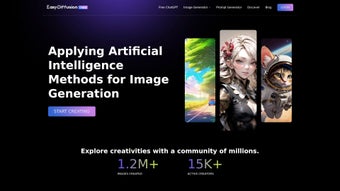

Download EasyDiffusion Online – Free AI Text‑to‑Image Generator, Secure Web Tool
Overview
EasyDiffusion Online is a powerful, browser‑only AI platform that converts plain‑language prompts into vivid, high‑resolution images within seconds. Built on the latest Stable Diffusion model, the service delivers photorealistic results as well as stylized artwork ranging from anime‑inspired characters to intricate sci‑fi landscapes. Because the engine runs on secure cloud servers, users are not required to own a dedicated GPU, install Python environments, or manage complex dependencies.
This eliminates the typical entry barrier for AI‑driven visual creation and makes the tool instantly accessible to anyone with an internet connection. Whether you are a hobbyist sketching quick concepts, a marketer needing eye‑catching visuals for social campaigns, or a professional designer looking for rapid prototyping, EasyDiffusion Online provides an intuitive interface that adapts to every skill level. The platform also integrates an intelligent prompt generator that expands vague ideas into richly detailed descriptions, helping users achieve higher fidelity results without spending hours fine‑tuning language.
Security is baked into the architecture: all data transfers are encrypted with HTTPS, and generated images are stored only temporarily unless the user explicitly saves them. The free tier offers generous daily credits, while a pay‑as‑you‑go model unlocks premium features such as ultra‑high‑resolution exports and batch processing. In short, EasyDiffusion Online democratizes AI art creation by offering a fast, secure, and cost‑effective solution that works on any device, from desktop workstations to smartphones.
Key Features
The true strength of EasyDiffusion Online lies in its extensive feature set, which balances raw creative power with user‑friendly design. Below is a detailed look at what makes this web‑app stand out in the crowded AI‑art market.
- Stable Diffusion Engine: Leverages the most recent Stable Diffusion model for photorealistic and stylized image generation, delivering results comparable to desktop‑grade solutions.
- Browser‑Only Access: No downloads, no installations—just open a web page and start creating, eliminating compatibility headaches.
- Optimized Prompt Generator: Automatically expands simple or vague text into richer prompts, adding adjectives, lighting cues, and compositional details that guide the model toward higher quality output.
- Multiple Art Genres: Supports Anime, Mecha, Pixel Art, sci‑fi, fantasy, cyberpunk, and more, with customizable style presets that let you switch aesthetics in a single click.
- High‑Resolution Export: Generate images up to 1024 × 1024 px for free; premium credits unlock larger dimensions and lossless formats suitable for print.
- Real‑Time Preview: Instantly view a low‑resolution preview, then upscale with a single button press to obtain the final high‑definition file.
- Secure Cloud Processing: All rendering happens on encrypted servers; prompts and images are deleted shortly after processing unless you choose to store them in your account.
- Free Tier & Pay‑As‑You‑Go: Unlimited basic generation for free; optional credits for higher resolution, batch jobs, or priority processing.
- API Access (Beta): Developers can integrate the service into custom workflows via a RESTful API, enabling automation and third‑party app integration.
- Community Gallery: Browse, remix, and get inspired by creations from other users, fostering a collaborative creative environment.
Installation & Usage Instructions
Getting started with EasyDiffusion Online is deliberately straightforward, and the entire workflow is designed to keep you creating rather than troubleshooting. Below is a step‑by‑step guide that expands on each stage of the process, ensuring even first‑time users can generate impressive images in under a minute.
- Open the Website: Visit easydiffusion.online using any modern browser (Chrome, Firefox, Edge, Safari). The platform automatically detects your device type and loads a responsive UI optimized for your screen size.
- Create an Account (Optional but Recommended): While anonymous usage is possible, signing up unlocks daily free credits, saves your favorite prompts, and lets you organize generated assets in personal collections.
- Enter Your Prompt: In the central text box, type a concise description of the desired image. For best results, include specifics such as style, lighting, perspective, and color palette (e.g., “a misty forest at sunrise, soft golden light, hyper‑realistic, cinematic depth of field”).
- Use the Prompt Generator: If you’re unsure how to phrase your idea, click “Enhance Prompt.” The AI will suggest additional descriptors and scene elements, turning a basic phrase into a detailed instruction set.
- Select a Style Preset: Choose a preset from the dropdown (Anime, Mecha, Pixel Art, etc.) or let the engine decide automatically based on your description.
- Adjust Output Parameters: Fine‑tune resolution, inference steps, and guidance scale. Beginners can keep default values; advanced users may experiment to control detail level and adherence to the prompt.
- Generate the Image: Press “Create.” Within seconds, a low‑resolution preview appears. Review the preview, then click “Upscale” to produce the final high‑resolution image.
- Download & Share: Use the “Download” button to save the image as PNG or JPEG. You can also copy a shareable link or post directly to social media platforms.
- Explore the Community Gallery: Browse other users’ creations for inspiration. The “Remix” feature lets you adopt an existing prompt as a starting point for your own variation.
- Manage Credits & Settings: If you run out of free credits, purchase additional credits or upgrade to a subscription plan. The dashboard provides real‑time usage statistics and lets you allocate credits to team members.
Because all processing occurs in the cloud, you never need to worry about GPU drivers, Python libraries, or hardware compatibility. Updates to the underlying model are applied automatically on the server side, ensuring you always have access to the latest improvements without manual intervention. For organizations, the admin console offers role‑based access, usage monitoring, and content policy enforcement, making EasyDiffusion Online suitable for both individual creators and collaborative teams.
Compatibility, Pros & Cons, and Frequently Asked Questions
EasyDiffusion Online is a true web‑application, which means it works on any operating system that supports a modern browser. This includes Windows 10/11, macOS Ventura and later, Linux distributions (via Chrome/Firefox), Chrome OS, iOS Safari, and Android Chrome. No additional plugins, extensions, or local installations are required. The responsive design adapts seamlessly to desktop monitors, laptops, tablets, and smartphones, allowing you to create wherever you are.
Pros
- Completely browser‑based – no installation or local hardware constraints.
- Generous free tier provides daily credits for casual creators.
- Extensive style library covering Anime, Mecha, Pixel Art, photorealism, and more.
- Prompt enhancer assists beginners in crafting effective, detailed descriptions.
- Secure, encrypted processing with short‑term data retention for privacy.
- Real‑time preview accelerates iterative creative work.
- API access enables integration into custom pipelines and third‑party apps.
- Community gallery fosters inspiration and collaborative remixing.
Cons
- High‑resolution renders and batch processing require credit purchase or subscription.
- Free tier limits the number of images you can generate per day.
- Complex prompts may occasionally produce artifacts or unexpected composition.
- Constant internet connection is mandatory; offline generation is not possible.
- Advanced parameter controls can be overwhelming for absolute beginners.
Frequently Asked Questions
Is EasyDiffusion Online really free?
Yes, the platform offers a completely free tier that includes daily credits for basic image generation and access to the prompt enhancer. Premium credits are optional and only needed for high‑resolution outputs or large batch jobs.
Do I need a powerful GPU to use EasyDiffusion Online?
No. All heavy lifting is performed on secure cloud servers. Your device only needs a stable internet connection and a modern browser.
Can I use EasyDiffusion Online on mobile devices?
Absolutely. The responsive UI works on iOS Safari and Android Chrome, allowing you to generate and download images directly from your phone or tablet.
How does the prompt generator improve my results?
The generator expands simple inputs by adding descriptive adjectives, lighting cues, and compositional details. This richer prompt guides the Stable Diffusion model to produce more accurate and visually appealing images.
Is my data safe when I use the service?
Yes. All communications are encrypted with HTTPS, and the platform does not retain your prompts or generated images beyond the short period needed for processing, unless you explicitly save them to your account.
Conclusion & Call to Action
EasyDiffusion Online stands out as a user‑friendly, secure, and feature‑rich AI text‑to‑image generator that democratizes high‑quality visual creation. Its browser‑only architecture eliminates traditional hardware and software barriers, while the built‑in prompt enhancer and diverse style library empower both novices and seasoned artists to produce compelling visuals in moments. Whether you need a quick concept sketch, a full‑blown digital illustration, or eye‑catching graphics for marketing, EasyDiffusion Online delivers fast, reliable results without compromising on quality. Take advantage of the free daily credits, experiment with the various artistic presets, and see how effortless AI‑driven creativity can be. Ready to turn your ideas into images? Visit easydiffusion.online, sign up in seconds, and start generating today.
Overall Rating: 4.5 / 5
EasyDiffusion Online offers an impressive blend of accessibility and power. The free tier is generous, the UI is clean, and the image quality rivals desktop‑based solutions. Minor drawbacks such as limited batch processing on the free plan and occasional artifacting on very complex prompts keep the rating from a perfect score, but overall it is one of the best web‑based AI art tools available today.



.png)



